


zplCloud Blog
Print Views: A Browser Print UI for the Shop Floor, Generated from Your Design
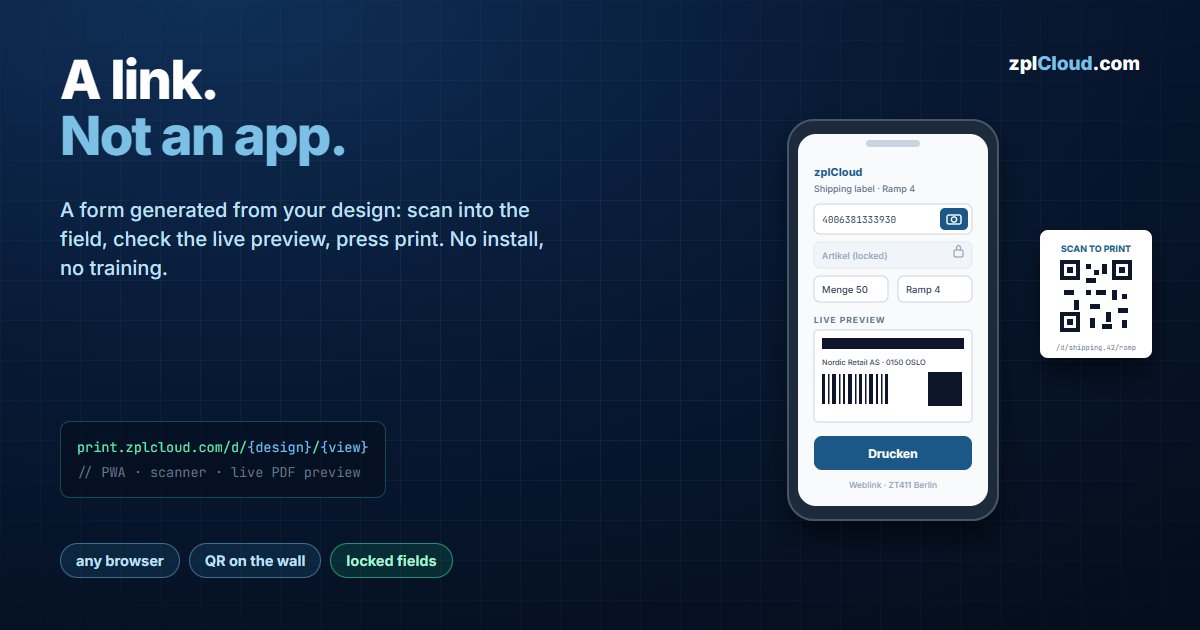
print.zplcloud.com/d/{design}/{view} - a form, a scanner field, a live preview, no installation.
The last mile of every label project
The label is designed, the printer is connected, and then the actual problem appears: fifteen people on two shifts need to print it, on devices you do not administer, without being trained on a label designer.
A Print View is that UI. It is generated from a saved design: you choose which of the design's variables the operator may fill in, and the platform renders a responsive form with a live preview and a print button. No app, no driver, no client install.
The URL
https://print.zplcloud.com/d/{designKey}/{viewSlug}
designKey is the design name plus its id (shipping-label.42); DHL-only views use the reserved key dhl. The page serves its own manifest.json and icon.png, so Add to home screen on Android or iOS gives the operator an app icon that opens straight into the form - a PWA without an app store.
What the operator sees
The form is built from the design's bindings, not from a single free-text box:
- Text fields with placeholders and validation - order number, quantity, destination.
- Dropdowns fed by a datasource, so an EAN is picked rather than typed.
- Checkboxes for options that change the label (express, fragile, return).
- Scanner button next to any field: tap the camera icon and scan a barcode or QR straight into the input. This is the feature that decides whether a Print View gets used - typing a 13-digit EAN on a phone at a packing table does not survive contact with reality.
- Live PDF preview that re-renders while typing, using the same server-side engine that generates the ZPL. What is on screen is what the printer produces.
Printing goes to a Weblink printer (relayed through the outbound tunnel to your network), a remote printer on a CLI agent, or out as a PDF for a local print dialog. GET …/printers on the view returns the printers the operator is allowed to choose.
What it does not expose
A Print View is a projection of a design, not a share link to it:
- Only the fields you marked visible are editable. Locked fields keep their design values and are not in the payload.
- Values are validated server-side against the design before rendering - a crafted POST cannot inject fields that the view does not define.
- The design itself, its other variables and the rest of the workspace are never sent to the browser.
That distinction matters when the link is on a wall poster: possession of the URL means the ability to print that one label, not access to your account.
Feeding it real data
Under Data source (data hub) a view can be backed by a live datasource - SQL Server or MongoDB through a CLI agent in your network. The operator's lookup then runs as a parameterized query against your database, and the returned row pre-fills the form. Nothing is copied to the cloud; the connection string stays on the agent machine.
The DHL variant goes further: an order number in the lookup field pulls the recipient out of your ERP, buys real postage and prints the stamp. That is covered in the INTERNETMARKE post.
Setting one up
1. Save a design in the designer.
2. Create the Print View, mark the fields the operator may edit, lock the rest.
3. Pick the printers the view may target.
4. Share the URL, or print the QR code and tape it next to the printer.
Practical notes
- One view per workflow, not per person. Views are cheap; a "return label" view and a "shipping label" view with three fields each beat one view with twelve fields and an instruction sheet.
- Test on the actual device. The camera scanner needs HTTPS and a permission grant. On a shared warehouse tablet, grant it once and the operator never sees the prompt again.
- Lock what should not vary. Article number from the lookup, quantity from the operator - not both editable, or you will get labels that contradict the pick list.
Plans
Starter includes 1 Print View, Pro 3; additional views are 2 € per month each. See the pricing page.