Cloud label platform for Zebra™ fleets · cloud, on-premises or hybrid
One platform for every label,
every Zebra printer, every site.
For everyone – from hobbyists at home to developers to manufacturers. One label platform for all.
zplCloud turns designs, data and printers into one governed pipeline: design labels visually, render production-grade ZPL including RFID encoding and print to Zebra™ fleets anywhere - from your ERP, the REST API, a browser, a smartphone or an AI agent. Start in the cloud, move on-premises when you need to - same platform, same API.
Bind any column to any field - CSV, JSON, SQL or API record, no ZPL knowledge required.
02
zplCloud
rendered in 18 ms
Designer & templates
Render engine · ZPL / PNG / PDF / SVG
Queue · retries · auto-reprint
API keys · roles · metering
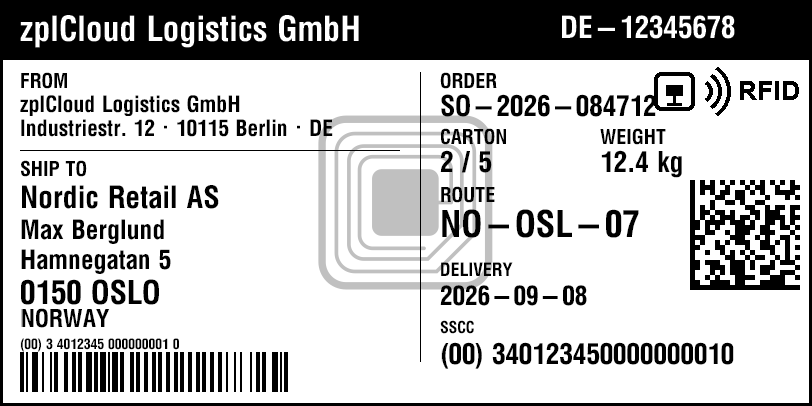
GS1 shipping label with RFID · 102 × 51 mm · 203 dpi
Rendered by the zplCloud engine from the ZPL below - SSCC as GS1-128, Data Matrix, reverse header, EPC SSCC-96 written to the RFID tag via ^RFW. What you see is what the Zebra prints and encodes.
Outbound connections only - no inbound ports, no VPN, no firewall changes at your sites.
We love all platforms
Windows
Linux
Raspberry Pi
macOS
iOS
coming soon
Android
coming soon
The agent and the CLI run right where your printers are. Mobile is on the way.
30+
barcode symbologies
4
ways to reach a printer
33
free ZPL tools
196
guides & 93 templates
7
push channels
10
languages in the UI
Label Designer
A visual canvas with real printer intelligence
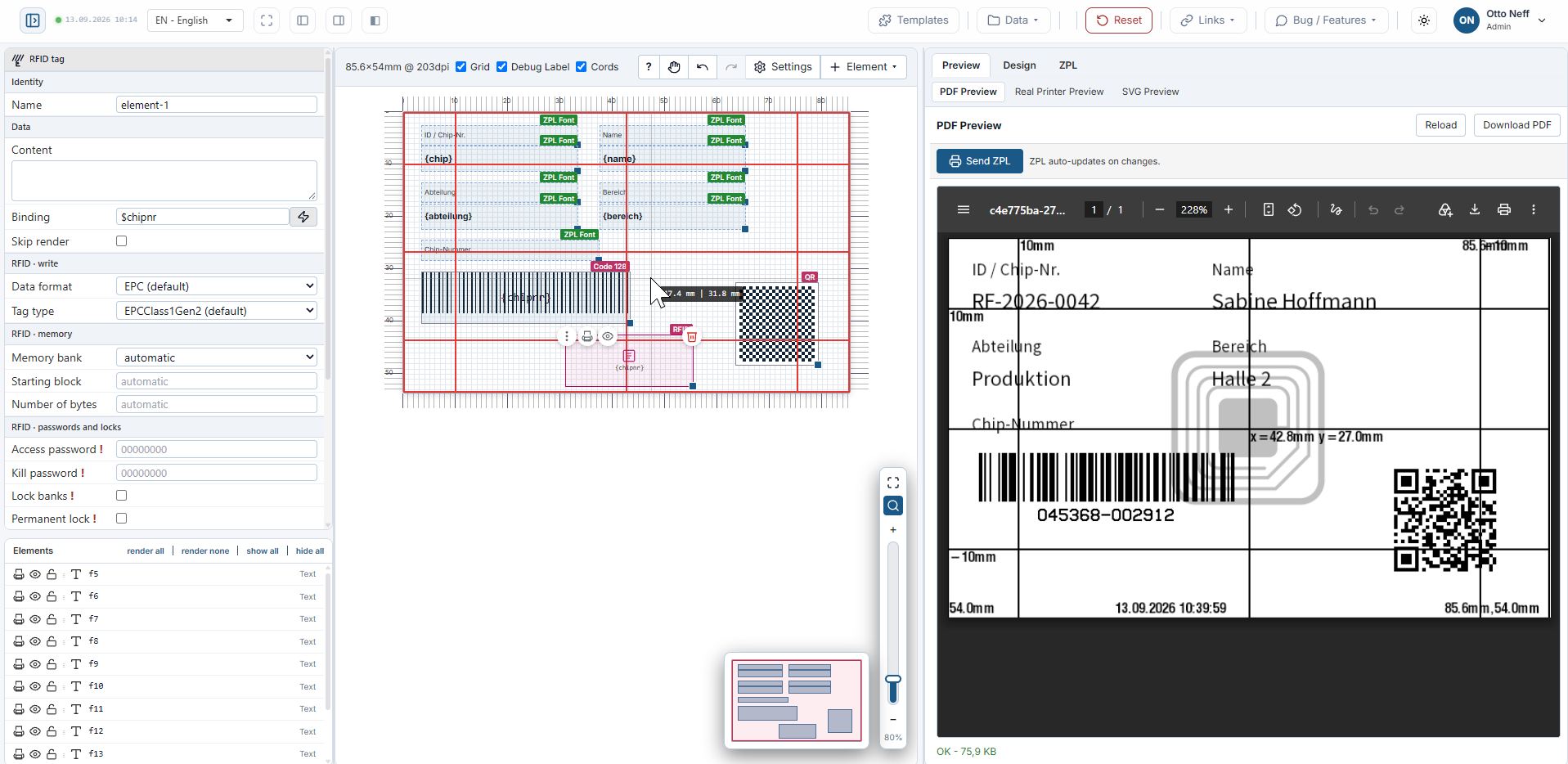
Design on a millimetre ruler with grid, snapping and zoom up to 300 %. Add text, barcodes, QR codes, GRF images, SVG icons, RFID tags and shapes - then push the exact same ZPL to your printer.
ZPL modes - native printer fonts (^A…^FD), TrueType via ^GFA images, or literal ^A@@ / ^FB.
RFID element - EPC Class 1 Gen 2 tag with SGTIN-96 data structure; GTIN + serial → EPC hex encoder with decode roundtrip.
Data binding - bind fields to CSV / JSON columns via $field and test with a built-in JSON record editor.
Templates & teams - gallery with search and tag filter (adresse, artikel, chemie, preis, versand), 60-step undo/redo, groups, lock & hide, auto-save to localStorage.
Unicode fonts - own OFL font ZPLCloud (CJK, kana, Hangul, Vietnamese, Russian Cyrillic), Liberation Sans (Latin Extended, Greek, Cyrillic) and Droid fallback; TTF fonts are pushed to the printer as E:ZPLCLOUD.TTF.
Compare versions
See every change before it goes live: in the code and on the label
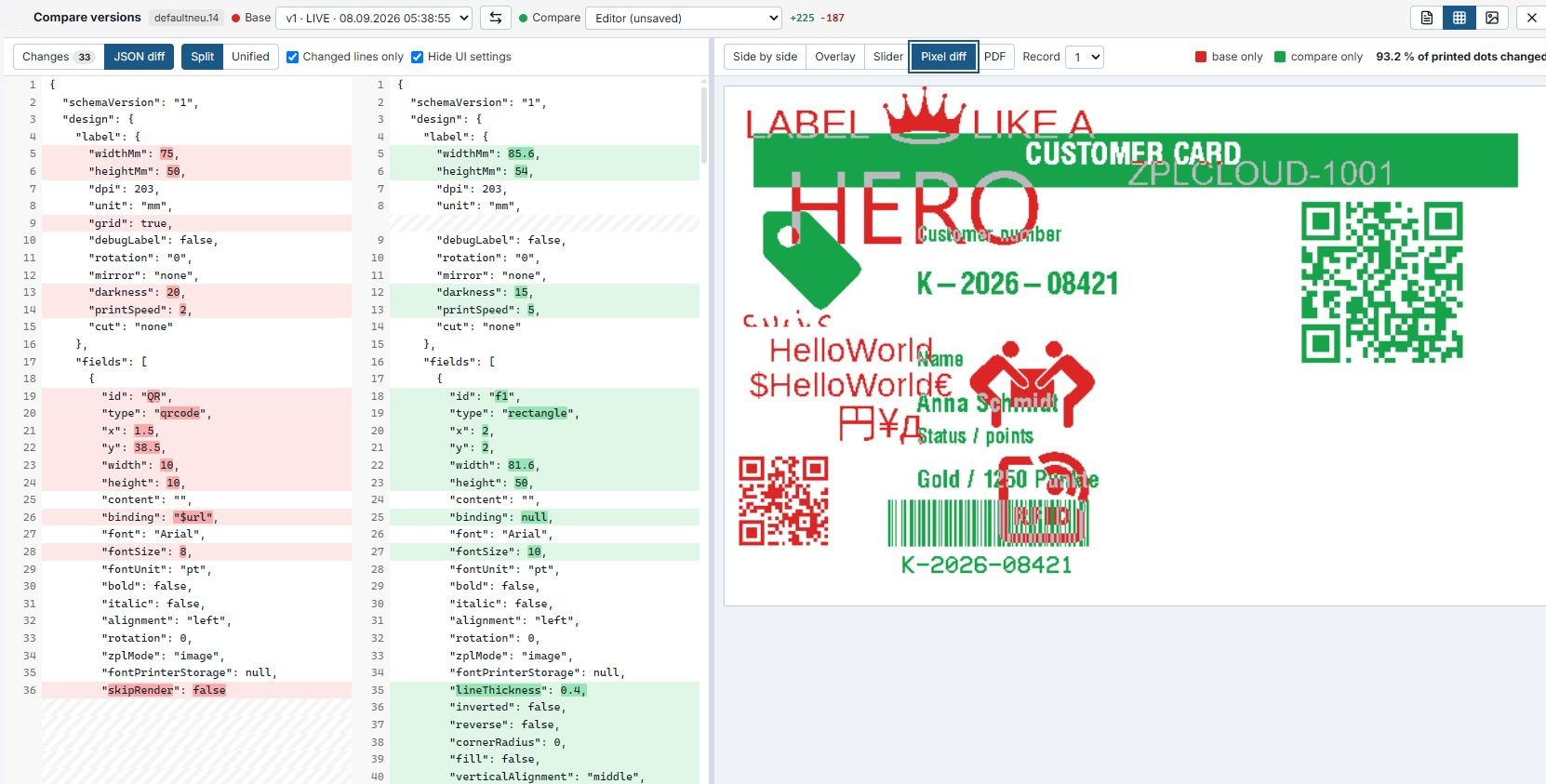
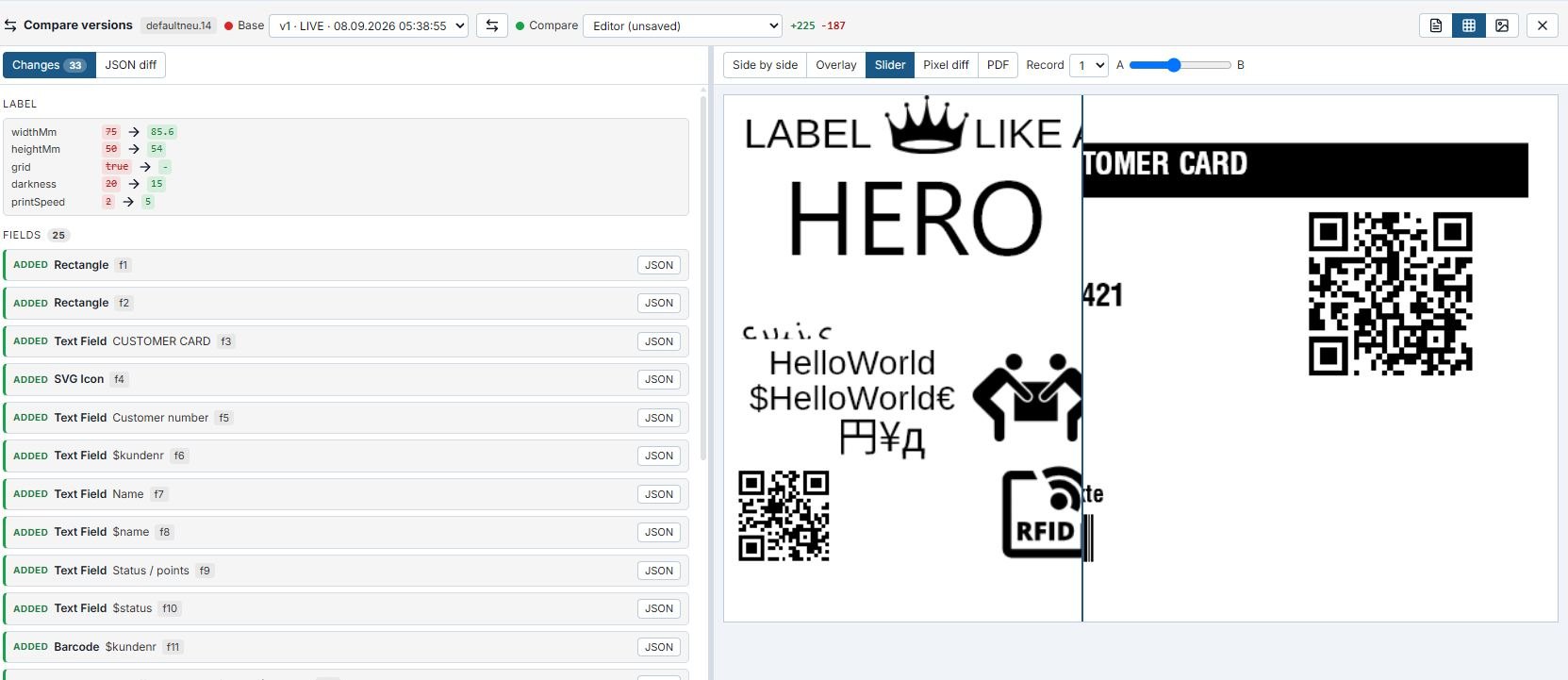
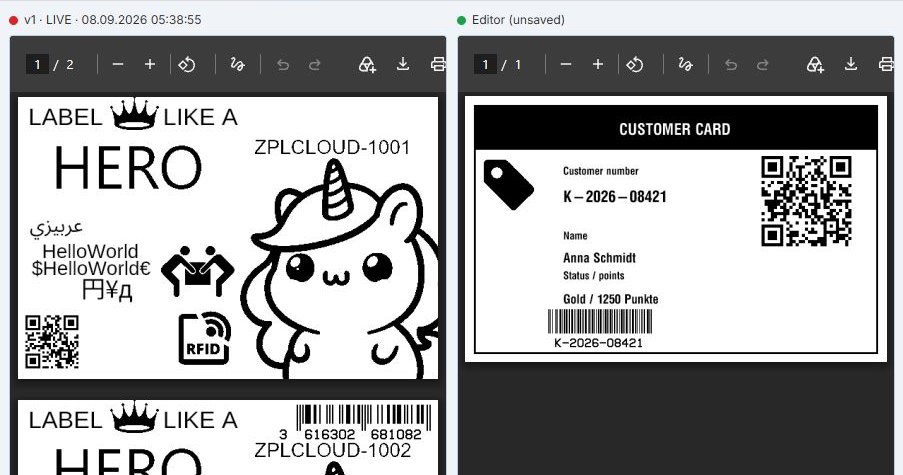
Before a label design goes to production, zplCloud puts the live version and the new state side by side. On the left you get a JSON diff like in git, on the right the real preview from the render engine. The pixel diff shows every changed printed dot, the slider and the PDF show what reaches the printer. No change goes live unseen.
JSON diff like git: split or unified, changed values marked word by word, unchanged lines collapsed.
Changes per field: added, removed or changed, each with the old and the new value. One click highlights the field in both previews.
Pixel diff: red exists only in the base, green only in the new state, plus the share of changed printed dots.
Slider, overlay and PDF: both states on top of each other or side by side, for every test record.
Any version against any other: even the unsaved state in the editor can be checked before saving.
Approval with a way back: draft, approve, go live. Saving, approving and going live can be undone at any time.
JSON diff and pixel diff: red shows the live version, green the new state.
Changes per field, next to the slider between both states.The PDF of the live version next to the new state, page by page.
ZPL
Native ZPL - no black box, no emulation surprises
zplCloud generates the exact ZPL the printer receives and shows it next to the design. Fonts and graphics can live in printer memory, so labels stay small and fast. Existing EPL2, DPL and TSPL code is converted to ZPL II, and every label can be linted and analysed before it hits the printer.
ZPL code mirror
Design ↔ ZPL live in both directions; ZPL → design import for legacy formats.
Fonts on the printer
ZPLCloud (OFL), Liberation Sans, Droid and your SVG icon fonts as E: fonts - one upload, tiny payloads.
Linter & analyser
Errors with line/column, command explanations, print-time and render prediction.
EPL2 / DPL / TSPL → ZPL
Migrate Eltron, Datamax and TSC label code to ZPL II with one call.
^XA ; label start^PW812^LL406^CI28 ; 4" wide, UTF-8^FO0,0^GB812,60,60^FS ; reverse header bar^FO20,14^A0N,34,34^FR^FDzplCloud Logistics GmbH^FS^FO20,184^A0N,30,30^FDNordic Retail AS^FS^FO20,278^A0N,32,32^FD0150 OSLO^FS^FO690,180^BXN,5,200^FDSO-2026-084712|2/5|3401…^FS ; Data Matrix^FO20,352^BY2,3,40^BCN,40,N,N,N^FD>;340123450000000010^FS ; GS1-128 SSCC^XZ
# unicode: one line, any script^FO20,110^A@N,60,60,E:ZPLCLOUD.TTF^FD日本語 中文 한국어 Русский^FS
Unicode printer font
ZPLCloud - our own Unicode font for Zebra printers
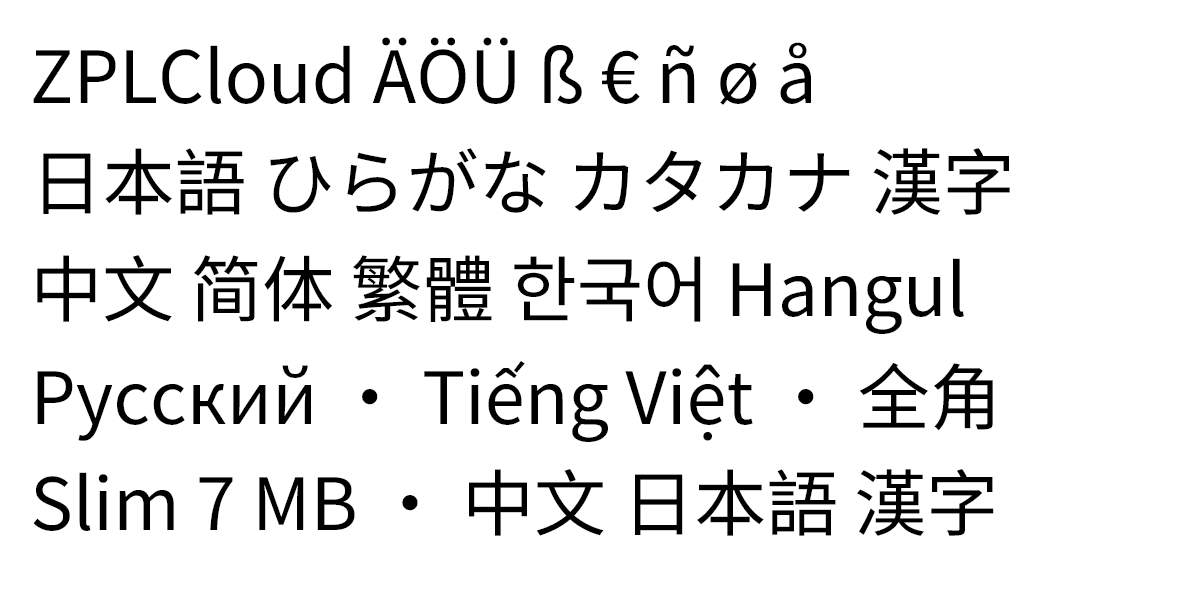
Resident Zebra fonts stop at Latin-1. ZPLCloud is zplCloud's own TrueType font, derived from Noto Sans CJK under the SIL Open Font License 1.1: 41,000+ code points for Latin-1, Vietnamese, Russian Cyrillic, all CJK ideographs, kana and Hangul. The preview is rendered server-side with the very file that is pushed to the printer as E:ZPLCLOUD.TTF - the printout matches the screen glyph for glyph.
41,000+
code points in one TTF
SIL OFL 1.1
open license - no per-printer font fees
E:ZPLCLOUD.TTF
uploaded once, used by every label
One line of ZPL: ^A@N,72,72,E:ZPLCLOUD.TTF^FD日本語^FS with ^CI28 (UTF-8) - no code pages, no per-language font juggling
Push once: the Printer Fonts tab uploads the TTF to selected printers - per fleet or per profile
European extras: Liberation Sans (OFL) covers Latin Extended (č ł ğ ő ș), accented Greek and full Cyrillic where ZPLCloud stops
Rendered by the zplCloud engine with E:ZPLCLOUD.TTF from the ZPL below - 1200 × 600 dots, 300 dpi. No mock-up: this is the PNG the preview returns.
font-specimen.zpl · 1200 × 600 dots · 300 dpi
^XA^PW1200^LL600^CI28 ; UTF-8^FO30,40^A@N,72,72,E:ZPLCLOUD.TTF^FDZPLCloud ÄÖÜ ß € ñ ø å^FS^FO30,147^A@N,72,72,E:ZPLCLOUD.TTF^FD日本語 ひらがな カタカナ 漢字^FS^FO30,254^A@N,72,72,E:ZPLCLOUD.TTF^FD中文 简体 繁體 한국어 Hangul^FS^FO30,361^A@N,72,72,E:ZPLCLOUD.TTF^FDРусский · Tiếng Việt · 全角^FS^FO30,468^A@N,72,72,E:ZPLCLOUD_SLIM.TTF^FDSlim 7 MB · 中文 日本語 漢字^FS^XZ
Performance
Built for volume: 100,000 labels in seconds
The API renders your saved design once per call and fills in the values of every record. Up to 500 records per request, one ^XA…^XZ block per record, ready for the printer.
One saved design, JSON records in, ZPL out - no per-label rendering
Up to 500 records per call: 100,000 labels are 200 calls
Parallel calls and additional instances scale the throughput
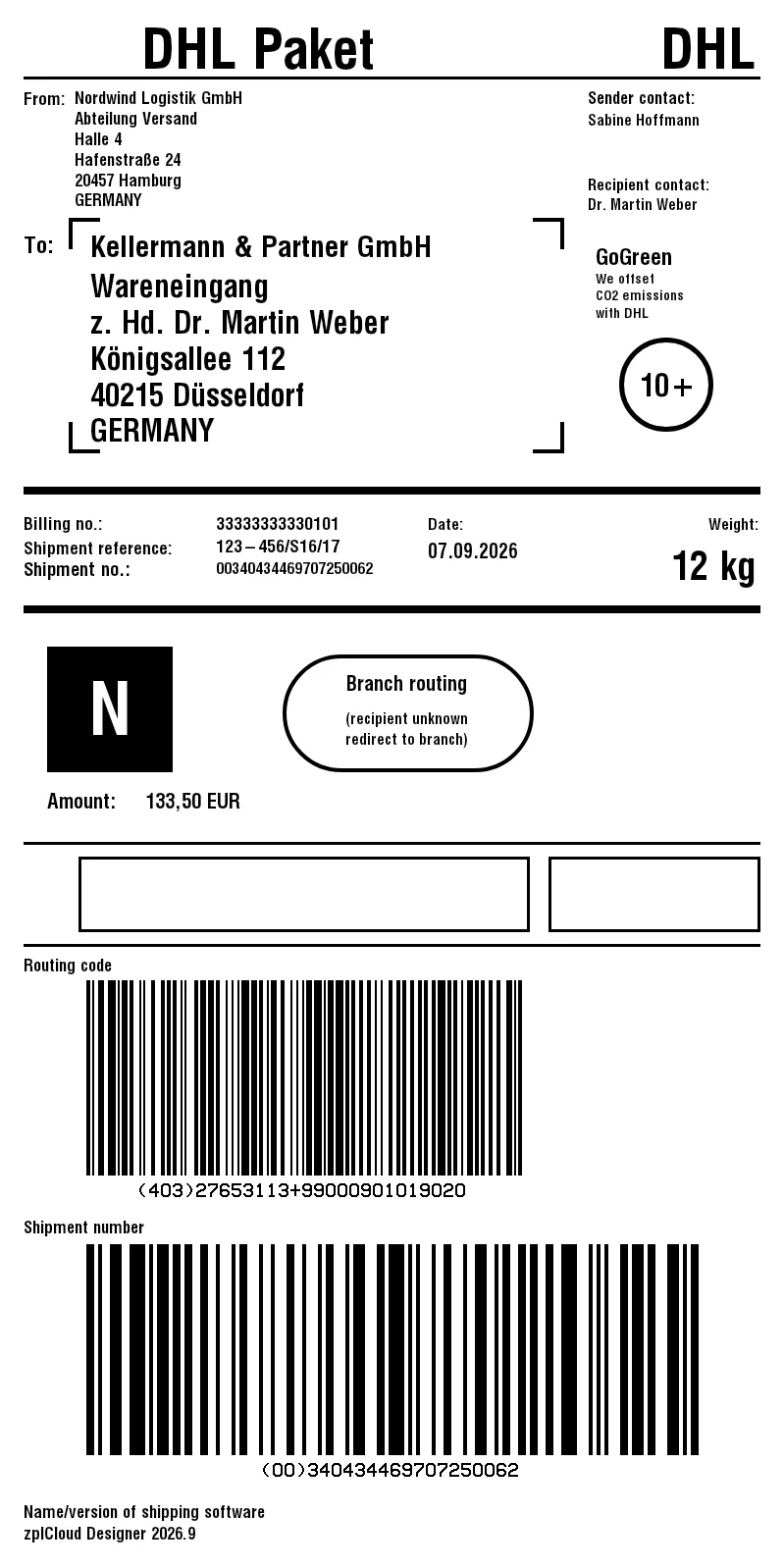
Measured with the DHL parcel template: 65 elements, two GS1-128 barcodes, 100 × 200 mm
How to scale further
1Send batches of 500 records instead of single calls - the design is rendered once per call.
2Run 4 to 8 calls in parallel - batch renderings are queued per instance, so latency stays predictable.
3Add instances - every instance adds its full throughput.
4Text fields, Code 128, GS1-128 and QR codes take the fast path; other bound elements fall back to full rendering.
None of these limits apply to enterprise customers: dedicated instances, no quotas, and the only limit is the bare metal.
Benchmark - template "DHL Paket" via api.zplcloud.com
Labels
API calls
Internet
Next to the server
Labels/s
1
1
29 ms
25 ms
41
100
1
82 ms
33 ms
3,019
1,000
2
290 ms
110 ms
9,190
10,000
20
2.6 s
770 ms
12,966
100,000
200
17.5 s
5.0 s
20,191
Measured on 9/7/2026: Internet = from a client over a regular connection to the test stage, gzip-compressed, 500 records per call, up to 8 parallel connections. Next to the server = the same load test as a container in the server's Docker network, without the internet line.
Connectors
Your databases, your buses, your storage
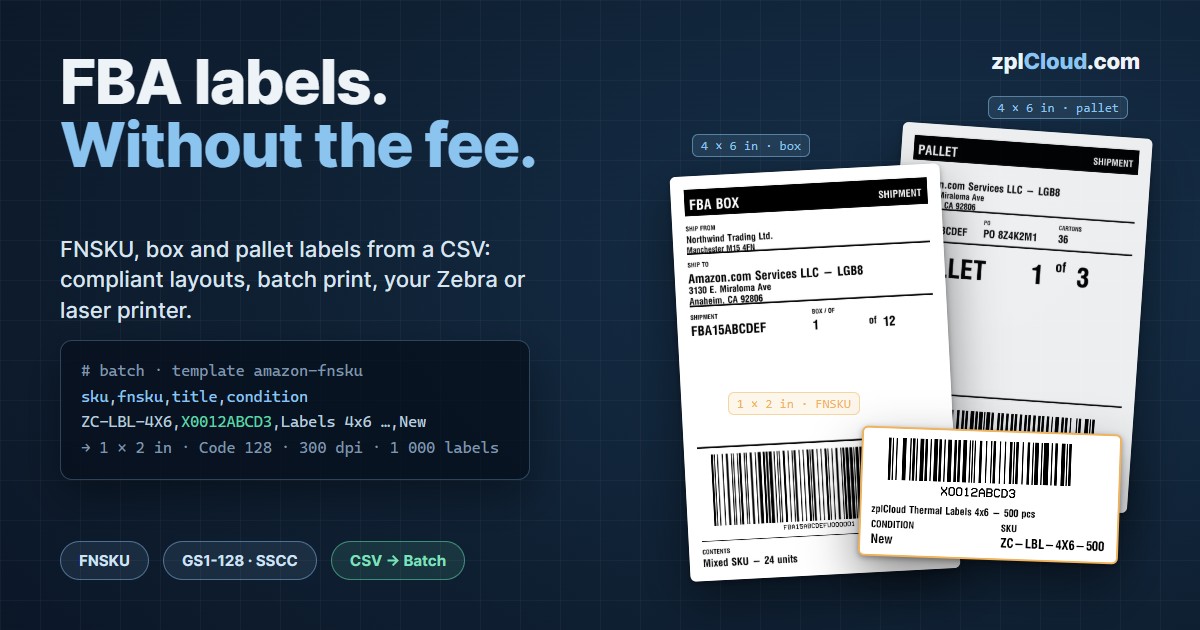
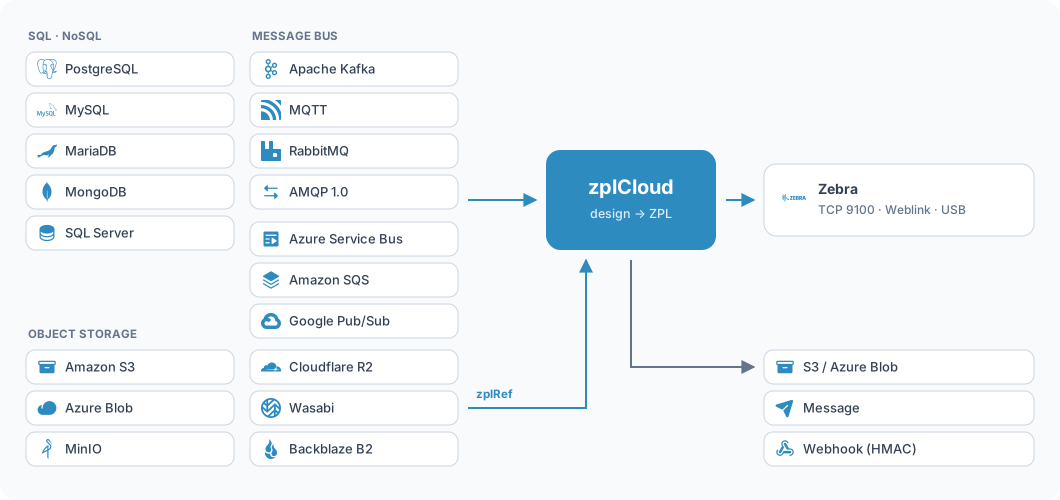
Labels are created where the data already lives. zplCloud speaks five databases, seven message buses and two object stores - through an outbound agent inside your own network or straight from the cloud.
Databases
Through the agent the credentials stay inside your network, only result rows leave it. Reachable cloud databases can also be connected directly, with no agent at all.
SQL Server
MongoDB
PostgreSQL
MySQL
MariaDB
Message buses
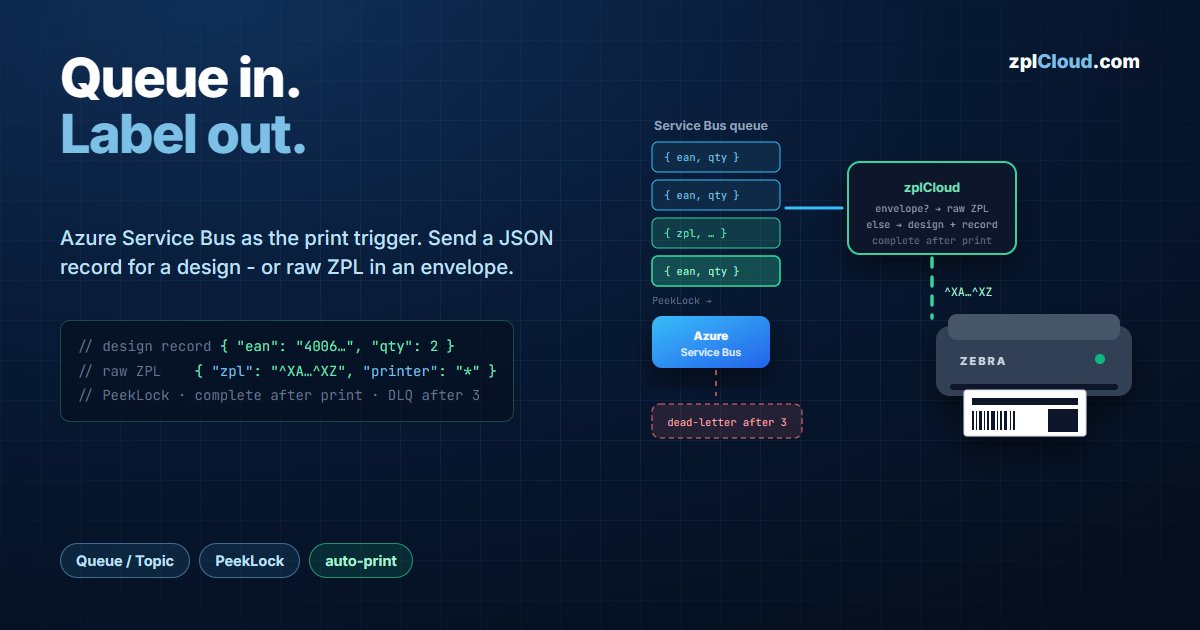
Every incoming message becomes a record, fills a design and prints - or carries finished ZPL. Nothing is acknowledged until the label has reached the printer.
Apache Kafka
Azure Service Bus
MQTT
AMQP 1.0
RabbitMQ
Amazon SQS
Google Pub/Sub
Object storage
Both directions: fetch the print file from the bucket, or drop the printed ZPL into it. S3-compatible, so MinIO, Cloudflare R2, Wasabi and Backblaze work too.
Amazon S3
Azure Blob Storage
MinIO
Cloudflare R2
Wasabi
Backblaze B2
Inbound: ZPL from object storage
Large print files do not belong inside a bus message. Instead of embedding the ZPL, the message points at it - and it is fetched at print time.
After every successful print zplCloud can do three things, individually or together:
1Store - the printed ZPL is written to S3 or Azure Blob as a file, named by your own template.
2Notify - a message goes to one of the seven buses, carrying the timestamp, the printer and the storage URL.
3Trigger - an HTTP POST to your own URL, HMAC-SHA256 signed like every other webhook.
REST API
Automate your label pipeline with
api.zplcloud.com
Authenticate with an API key (X-API-Key or Basic Auth), render saved designs as ZPL, PDF or PNG, call every ZPL tool as an endpoint and run batch jobs that print straight to your printers - with usage metering and an optional webhook callback on render, tool, enrichment, batch and account calls.
All 22 ZPL tools as endpoints (/v1/tools/zpl-to-pdf …) - no rate limits, counted as renders
Batch jobs with up to 10,000 records on the Pro plan - sync or async with job status, printed in blocks to Weblink, remote or virtual printers, optional pick list PDF
Optional webhook callback on render (PDF/PNG), tool, enrichment, batch and account endpoints (webhookId), with or without the result - plus printers, agents and label quota via GET
Designs cached 60 minutes, invalidated on save or delete
Body limits for ZPL rendering by design: max. 500 records, 1 MB per request
OpenAPI / Scalar interactive docs at /api/scalar
TLS 1.2 / 1.3, 12-character password policy, team roles Admin / Member
Your labels are ZPL. Printers that don't speak it still get the same label: rendered dot for dot at their resolution and sent in their own language, ready for TCP port 9100 - or as PNG, JPG and PDF for everything else.
11 printer languages
TSPL, EPL2, DPL, SBPL, CPCL, ESC/POS, Brother raster, PCL, Easy Plug, TPCL and JScript - as website tools and as POST /v1/tools endpoints.
1:1, dot for dot
The label is rendered as an image at the printer's resolution. Fonts, barcodes and emulation differences no longer matter - the printer only prints dots.
Small jobs
Where the language allows it, the image is compressed: a 4 × 6 inch shipping label shrinks from 121 KB to under 10 KB with Toshiba's TOPIX.
PNG, JPG and PDF
For office printers, e-mail and archives the same label comes as an image or as a PDF at original size.
Built from the manufacturers' programming manuals. Firmware differs between models - print one test label before you roll out.
Ops quick start
From zero to a connected printer in one line
zplCloud CLI
One-liner - installed everywhere
The zplcloud CLI applies printer profiles, sends raw ZPL (TCP 9100 / USB) and opens an outbound proxy agent for remote printers - without inbound ports or firewall changes.
The generated compose file below uses these values.
services:zplcloud-agent:
image: docker.zplcloud.com/zplcloud-agent:latest
container_name: zplcloud-agent
restart: unless-stopped
environment:
ZPLCLOUD_API_KEY: "sk_zplcloud_CHANGE_ME"# from the API tab
ZPLCLOUD_AGENT: "PI"# name in Remote Printers
ZPLCLOUD_API_BASE: "https://api.zplcloud.com"
ZPLCLOUD_LOG: "true"# daily log file
ZPLCLOUD_LOG_DIR: "logs/zplcloud-logs"volumes:
- ./logs/zplcloud-logs:/logs/zplcloud-logs
- /dev/bus/usb:/dev/bus/usb# USB access (libusb)
#privileged: true # simplest USB path$docker compose -f docker-compose.agent.yml up -d
✔ Container zplcloud-agent Started
Docker Compose
Agent as a container - Raspberry Pi, Synology & Co.
Runs on any Docker host: 64-bit Raspberry Pi, Synology NAS, Intel or Apple Silicon Mac. The image is multi-arch (linux/amd64 + linux/arm64), public and pullable without login - no .NET SDK needed.
docker compose -f docker-compose.agent.yml up -d
Image: docker.zplcloud.com/zplcloud-agent:latest
USB printers: privileged: true or a udev rule
Weblink
Install certificates - with one-liners
Download your printer's three Weblink NRD files and push them to the device via TCP 9100: ~DYE upload, SGD settings (URL, NTP, time) and reset - done. The script is generated server-side for your printer and requires a valid API key.
Windows: weblink-deploy.ps1 (PowerShell 5.1+)
macOS / Linux / Raspberry Pi: weblink-deploy.sh (bash)
The generated commands below use these values. Hostname not resolving on your network? No problem - just deploy with the IP: it becomes &ip=… and overrides the TCP target, the hostname still selects the certificate.
PS>irm "https://zplcloud.com/weblink-deploy.ps1?hostname=printer01&apikey=sk_zplcloud_XXXX&ip=" | iex
[2026-08-22 09:00:00] SUCCESS - certificates installed on the printer
$curl -fsSL "https://zplcloud.com/weblink-deploy.sh?hostname=printer01&apikey=sk_zplcloud_XXXX&ip=" | bash
[2026-08-22 09:00:00] SUCCESS - certificates installed on the printer
$curl -fsSL "https://zplcloud.com/weblink-deploy.sh?hostname=printer01&apikey=sk_zplcloud_XXXX&ip=" | bash
[2026-08-22 09:00:00] SUCCESS - certificates installed on the printer
$curl -fsSL "https://zplcloud.com/weblink-deploy.sh?hostname=printer01&apikey=sk_zplcloud_XXXX&ip=" | bash
[2026-08-22 09:00:00] SUCCESS - certificates installed on the printer
CloudToBrowserPrint
Print directly from the browser and the cloud - on every platform
zplCloud2BrowserPrint is a local print service (127.0.0.1:9100) for Windows, macOS, Linux and Raspberry Pi: web pages find printers on the LAN and print ZPL, PDF, Office files, images and barcodes - directly from the cloud with the label designer, an alternative to CLI/Proxy and Cloud Connect: automated, in batch and without desktop software.
Device discovery - installed printers (Windows spooler), CUPS (Linux/macOS), network (TCP 9100) and Bluetooth - types individually filterable.
Printing - raw ZPL, URLs and files from the browser (multipart); multiple jobs in one request.
$curl -fsSL https://zplcloud.com/install-cloudtobrowserprint.sh | sh
# Windows (PowerShell, no admin):PS>irmhttps://zplcloud.com/install-cloudtobrowserprint-pshell | iex
# start:$ zplcloud2print
as a service - survives reboots (Restart)
$ zplcloud2print --service-install# Linux/Pi: systemd "zplcloud2print.service"
# Restart=always · starts at boot# macOS: launchd LaunchAgent (KeepAlive) · at login# Windows: scheduled task · at login, no admin# uninstall:$ zplcloud2print --service-uninstall
CloudToBrowserPrint features for all platforms
Feature
Windows
macOS
Raspberry Pi
Linux x64
PDF / images / Office → ZPL
✓
✓
✓
✓
Barcode decoding
✓ ZBar
✓ Vision
✓ ZBar
✓ ZBar
Printing: spooler / CUPS / network / Bluetooth
✓ Spooler+TCP+BT
✓ CUPS+TCP+BT
✓ CUPS+TCP+BT
✓ CUPS+TCP+BT
Bidi: Serial / Parallel / IPP
✓ all
✓ Serial+IPP
✓ Serial+IPP
✓ Serial+IPP
HTTPS certificate (trust store)
✓ Store
✓ Keychain
✓ NSS
✓ NSS
As a service (restart on reboot)
✓ schtasks
✓ launchd
✓ systemd
✓ systemd
Deploy anywhere
Cloud, hybrid or fully on-premises - your choice, same platform
zplCloud is containerized and cloud-agnostic. Start on zplcloud.com today, connect your sites with outbound agents, and move the whole platform into your own data center or cloud account when compliance demands it.
Cloud (SaaS)
Fully managed on zplcloud.com: designer, API, print queue and Print Views - live in minutes, no infrastructure, automatic updates.
Developer → Pro
api.zplcloud.com
print.zplcloud.com
Hybrid
Keep printers where they are. Zebra Weblink, CLI agents or the browser print service open a single outbound connection - no inbound ports, no VPN, no firewall changes.
Outbound only
mTLS
Docker · Raspberry Pi · Synology
Private / On-premises
The complete platform as containers in your data center or your Azure, AWS or Google account. Dedicated queue, custom API limits, SSO/SAML, custom ERP/SAP connectors and an SLA.
Enterprise
Your infrastructure
Custom SLA
Four ways to reach a printer - pick per site, mix freely
Can we run zplCloud on-premises or in our own cloud account?
Yes. The Enterprise plan ships the complete platform as containers for your own data center or your Azure, AWS or Google account - with a dedicated queue, custom API limits, SSO/SAML, custom ERP/SAP connectors and an SLA. Cloud and on-premises share the same API, so integrations move without changes.
Which printers and printer languages are supported?
Zebra ZPL printers natively - including Weblink, RFID and SGD tools. Any network printer that accepts raw TCP 9100 (CAB, Novexx, Avery and more) can be driven with ZPL, EPL2, EasyPlug or PCL, and the EPL2 / DPL / TSPL converters migrate legacy label code to ZPL.
How do we connect our ERP, WMS or databases?
Via the REST API (render a design by ID as ZPL, PDF or PNG, or, on the Pro plan, run batch jobs with up to 10,000 records that print directly), webhooks, CSV/JSON uploads and URLs, or the data hub: SQL Server and MongoDB datasources through outbound CLI agents (Pro plan) plus Kafka and Azure Service Bus streaming subscriptions that print automatically - on every plan: Developer and Starter for testing, Pro with 2 endpoints included.
How is access controlled across teams and sites?
API keys are scoped to a user, team or company; printers, designs and Print Views inherit that ownership. Roles (Admin, Member), per-host branding and revocable mTLS printer certificates keep every site isolated.
Can we automate zplCloud completely through the API?
Yes. On api.zplcloud.com you render saved designs as ZPL, PDF or PNG, call every ZPL tool of the website as its own endpoint (e.g. ZPL to PDF, PDF to ZPL, barcodes and GS1) and read your printers, agents and current label quota. On the Pro plan, batch jobs render up to 10,000 records, build pick lists and print straight to your printers, and label enrichment runs via the API too. Render (PDF/PNG), tool, enrichment, batch and account calls can report to one of your webhooks when they finish - with or without the result. The interactive reference is at api.zplcloud.com/scalar, the guides are in the docs.
How are API calls counted against our label quota?
API renders use the same monthly label counter as the platform - per account, per calendar month, plan limit plus purchased top-ups. Design renders (ZPL, PDF, PNG) and batch jobs count one render per label and stop with a clear error once the quota is used up. The ZPL tools and label enrichment are never rate-limited or blocked, but every call is counted too. GET /v1/quota shows limit, usage and remaining labels at any time.
Do I need a Zebra printer to use zplCloud?
No. You can design and preview labels as PNG, PDF and SVG in the browser without any hardware. Printing is available the moment you connect a printer - locally, via the Weblink relay or through a remote CLI agent.
How do remote printers work through a firewall?
A zplCloudCli agent runs on any machine in the printer's LAN (PC, Raspberry Pi, Synology, Docker) and opens a single outbound WebSocket connection to our backend - TeamViewer-style. No inbound ports, no port forwarding, no firewall changes on the customer side.
Which barcode symbologies are supported?
30+ verified symbologies including QRCode, DataMatrix, Pdf417, Aztec, MaxiCode, EAN/UPC, Code128/39/93, GS1-128, Postnet and Planet - all verified for correct ZPL output.
Does it support RFID / EPC labels?
Yes. The designer includes an RFID element for EPC Class 1 Gen 2 tags with the SGTIN-96 data structure - GTIN + serial are encoded to EPC hex with a full decode roundtrip, and output as ^RS / ^RB / ^RFW ZPL.
How does the Weblink relay keep connections alive?
The relay proactively probes every printer with ! U1 getvar "device.unique_id", tracks per-printer keepalive timestamps, cleans up duplicate connections and re-sends failed jobs from the queue.
In which languages is the platform available?
Ten languages: English, German, Chinese, Japanese, Spanish, French, Portuguese, Italian, Arabic (right-to-left) and Hindi - website and platform alike. Light and dark themes follow your OS preference automatically; every UI string lives in one translation dictionary per language.
Ready to print at scale?
Design your first label in minutes. Enterprise: private deployment, SLA and SSO/SAML on request.








 Windows
 Linux
Linux
 Raspberry Pi
 macOS
macOS
 Android


 SQL Server
 MongoDB
 PostgreSQL
 MySQL
MySQL
 MariaDB

 Apache Kafka
 Azure Service Bus
 MQTT
MQTT
 RabbitMQ
 Amazon SQS
 Google Pub/Sub

 Amazon S3
 Azure Blob Storage
 MinIO
MinIO
 Cloudflare R2
 Wasabi
 Backblaze B2