



Inventory
Address Label
An address label with recipient name and address, the tracking number as a Code 128 barcode and a QR code – compact, print-ready at 203 dpi and freely editab…
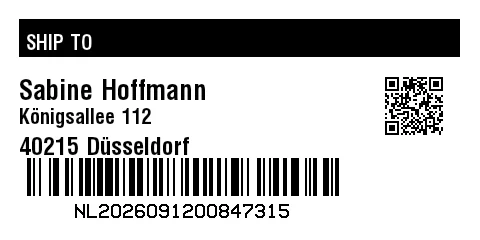
Rendered from this template's ZPL - exactly how the label leaves the printer. Click to enlarge.
ZPL code
^XA
^MD15
^PR5
^LL240
^PON
^PQ1,0,0,N
^MUd
^PW480
^MNY
^LH0,0
^PMN
^CI28
^BY,2,2,0
^FO19,19
^GB441,38,38,B
^FS
^FO26,28
^GB427,28,28,B
^FS
^FR
^FWN
^FO26,34
^A0,20
^FB427,1,6,L,
^FDSHIP TO
^FS
^FO27,158
^BY2
^BCN,38,N,N,N,N
^FD>:NL>52026091200847315
^FS
^CI13
^FWN
^FO75,204
^AD,,9
^FDNL2026091200847315
^FS
^FO385,75
^BQN,2,2,M
^FDA,https://zplcloud.com/t/NL2026091200847315
^FS
^FWN
^FO19,79
^A0,27
^FB340,1,6,L,
^FDSabine Hoffmann
^FS
^FWN
^FO19,108
^A0,21
^FB340,1,4,L,
^CI28
^FDKönigsallee 112
^FS
^FWN
^FO19,137
^A0,24
^FB340,1,8,L,
^CI28
^FD40215 Düsseldorf
^FS
^XZ
An address label with recipient name and address, the tracking number as a Code 128 barcode and a QR code – compact, print-ready at 203 dpi and freely editable in the editor.
What is this label for?
It combines address data with scan codes: recipient name and address for the eye, Code 128 and QR for sorting, delivery and digital shipment tracking.
What this template contains
- Recipient name
- Street, postcode and city
- Tracking number as Code 128 barcode with human-readable text
- QR code with tracking link
When to use it
- Address and customer labels
- Shipping and parcel marking
- Shipment tracking via QR link
How to edit it in the editor
Open it in the visual editor, change text, sizes, fonts and barcodes by clicking on each element and export to ZPL, PNG or PDF.