



Shipping
International Shipping
Shipping label for international parcels with sender, receiver and barcode fields.
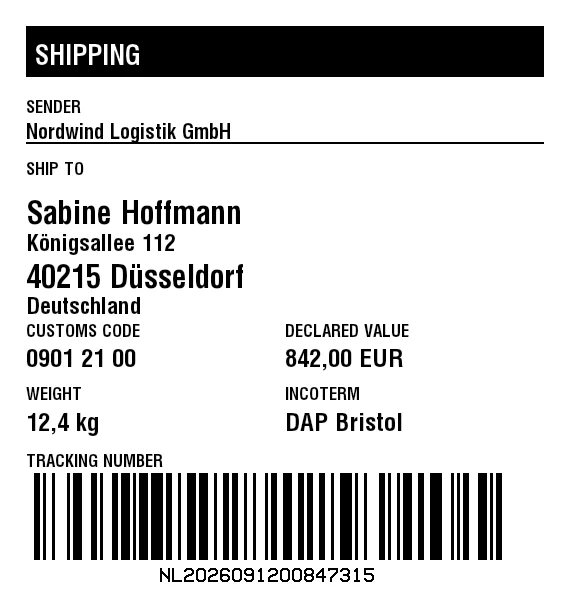
Rendered from this template's ZPL - exactly how the label leaves the printer. Click to enlarge.
ZPL code
^XA
^MD15
^PR5
^LL610
^PON
^PQ1,0,0,N
^MUd
^PW569
^MNY
^LH0,0
^PMN
^CI28
^BY,2,2,0
^FO26,26
^GB518,51,51,B
^FS
^FO35,38
^GB500,37,37,B
^FS
^FR
^FWN
^FO35,44
^A0,27
^FB500,1,6,L,
^FDSHIPPING
^FS
^FO34,473
^BY3
^BCN,87,N,N,N,N
^FD>:NL>52026091200847315
^FS
^CI13
^FWN
^FO160,568
^AD,,9
^FDNL2026091200847315
^FS
^FWN
^FO26,454
^A0,17
^FB518,1,4,L,
^FDTRACKING NUMBER
^FS
^FWN
^FO26,324
^A0,17
^FB247,1,4,L,
^FDCUSTOMS CODE
^FS
^FWN
^FO26,349
^A0,25
^FB247,1,6,L,
^FD0901 21 00
^FS
^FWN
^FO285,324
^A0,17
^FB247,1,4,L,
^FDDECLARED VALUE
^FS
^FWN
^FO285,349
^A0,25
^FB247,1,6,L,
^FD842,00 EUR
^FS
^FWN
^FO26,387
^A0,17
^FB247,1,4,L,
^FDWEIGHT
^FS
^FWN
^FO26,413
^A0,25
^FB247,1,6,L,
^FD12,4 kg
^FS
^FWN
^FO285,387
^A0,17
^FB247,1,4,L,
^FDINCOTERM
^FS
^FWN
^FO285,413
^A0,25
^FB247,1,6,L,
^FDDAP Bristol
^FS
^FWN
^FO26,100
^A0,17
^FB518,1,4,L,
^FDSENDER
^FS
^FWN
^FO26,123
^A0,21
^FB518,1,4,L,
^FDNordwind Logistik GmbH
^FS
^FO26,142
^GB518,2,2,B
^FS
^FWN
^FO26,162
^A0,17
^FB518,1,4,L,
^FDSHIP TO
^FS
^FWN
^FO26,200
^A0,31
^FB518,1,8,L,
^FDSabine Hoffmann
^FS
^FWN
^FO26,234
^A0,23
^FB518,1,6,L,
^CI28
^FDKönigsallee 112
^FS
^FWN
^FO26,264
^A0,31
^FB518,1,8,L,
^CI28
^FD40215 Düsseldorf
^FS
^FWN
^FO26,297
^A0,23
^FB518,1,6,L,
^FDDeutschland
^FS
^XZ
Shipping label for international parcels with sender, receiver and barcode fields.
What is this label for?
It addresses international parcels: sender, receiver and barcode for cross-border shipments.
What this template contains
- Sender
- Receiver
- Receiver address
- Customs tariff number, goods value and weight
- Delivery terms (Incoterm)
- Barcode
When to use it
- E-commerce and parcel shipping
- Logistics and fulfillment
- Handover to carriers
- Returns and exchanges
How to edit it in the editor
Open it in the visual editor, change text, sizes, fonts and barcodes by clicking on each element and export to ZPL, PNG or PDF.